
Read the privacy-policy wording behind your report
By CertScore.ai · Updated
Find discovered policy pages, inspect retained disclosures and keep the source URL and capture time with your review.
CertScore.ai’s privacy-policy evidence features are available in scan reports. Start in Executive overview and open Policy surfaces to see the pages the scan found. In Detailed evidence, expand Policies & disclosures to review 11 privacy-policy transparency checks, including GDPR-related topics such as legal basis, retention, privacy rights and international transfers.
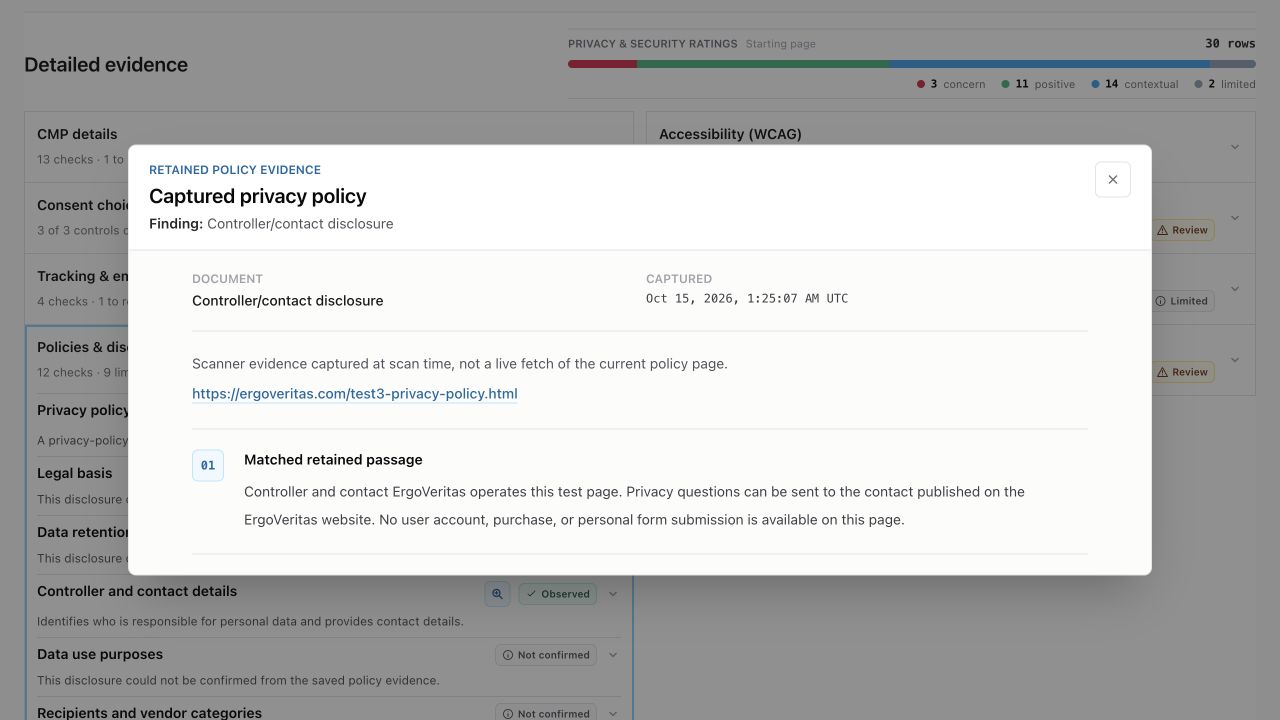
When supporting wording is available, the magnifying glass opens the retained passage with its source URL and capture timestamp. Services & Resources also shows policy-disclosure evidence beside detected services where supported. Connected agents can retrieve retained policy evidence for accessible reports and keep the source text with their explanations.
This guide shows how to use the policy-evidence features available in CertScore.ai reports, alongside a new study of 5,000 archived reports. Report access and usage limits apply; evidence coverage varies with language and the wording retained by each scan.
Follow the policy from discovery to passage
- Open Policy surfaces in Executive overview to see the policy pages the scan discovered.
- Follow Detailed evidence and expand Policies & disclosures. Its 11 privacy-policy transparency checks cover availability and ten content topics; the section also has a separate cookie-disclosure check.
- Use the magnifying glass beside an available disclosure to read its retained passage, source URL and capture timestamp. The viewer shows evidence retained at scan time, rather than a live fetch of the current policy.
Read policy wording beside detected services
In Services & Resources, available Policy disclosure markers open supporting policy wording and its source. Reading a policy mention beside a detected service can help you decide what to investigate. The policy statement and the scan observation answer different questions; neither alone establishes legal compliance.
What 5,000 archived reports brought into view
In 611 of 728 captured retention passages (84%), the study found conditions for keeping information without an explicit numeric period. One of the four quoted examples says certain contract and transaction records remain for ten years after the last interaction. Its record type and starting event are part of that statement.
These are counts of captured evidence in a recency-selected snapshot, not disclosure rates or a compliance ranking. The article explains eligibility, repeated wording, overlapping topics, English-only retention coding and CertScore.ai’s commercial interest.
Read more:Read the article and methods
Keep the source text with an agent’s answer
A connected agent can retrieve retained policy evidence for an accessible report. Ask which records the policy says it keeps after an account closes, and request the supporting passage, source URL and capture timestamp. Keep policy wording, observed website behavior and legal interpretation separate.
Try this prompt: “Use the existing CertScore.ai report [SCAN_ID]. Show the retained data-retention wording with its source URL and capture time. Explain what it says happens after an account closes, and identify anything the excerpt cannot answer.”
Replace [SCAN_ID] with an accessible completed report. Keep section="policy" with each pagination cursor until pagination.complete is true. This is a tool-call example; the passage and source must come from the actual report response.
certscore_get_report_evidence_page({
  "scanId": "[SCAN_ID]",
  "section": "policy"
})
Read more:Connect an agent to CertScore.ai
Try it
Scan your own website
Enter your website URL to start a free scan and inspect the privacy-policy pages and supporting passages retained in your report.
Loading scan form…
Start with a free scan of one public page. Results describe the scan’s conditions and coverage.