Privacy policy risk scanner

Privacy policy scanner

Check whether your website has a discoverable privacy policy, see the disclosure evidence, and compare it with the cookies, trackers and services your page actually loads. Start with a free scan of one public page.

By CertScore.ai · Updated

CertScore.ai scans public website behavior for review signals. Findings are automated observations backed by retained evidence, not legal advice, certification, or compliance determinations.

What the scan reviews

Policy/runtime alignment
Tracking and vendor disclosure coverage
Cookie disclosure gaps
Session replay disclosure review
Privacy request and contact surface signals

Check your website’s privacy policy

Loading scan form…

Inside a completed scan

Follow a privacy-policy check to its evidence

This test-site report found a privacy-policy surface and retained its source. Open a policy check to review the supporting disclosure evidence, then compare it with the services observed on the page.
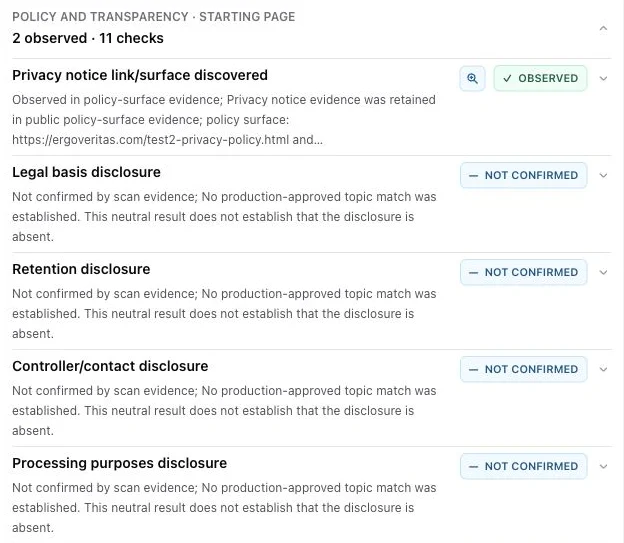
Actual report checklist showing a discovered privacy-policy surface and disclosure checks.
ErgoVeritas test page · California · 28 September 2026. Open the image to enlarge it.
Explore this completed report →

1. Find the policy and confirm the source

Enter the website URL above. In the report, open Policy and Transparency and follow the privacy-policy source link. Confirm that the notice covers the scanned website or service. A supported missing-policy finding is a priority review item; an existing policy gives you a source to inspect.

2. Review what the policy explains

Inspect the retained passages for processing purposes, controller and contact details, retention, recipients, transfers and privacy rights. Use the source-linked evidence to identify the exact wording your team needs to review. The sample report above shows how the policy surface and individual disclosure checks are presented separately.

3. Compare claims with browser activity

Open Services & Resources to review the analytics, advertising and session-replay services observed on the page, their purposes, timing and available policy mentions. Compare a specific policy promise with the corresponding request or cookie evidence. For example, the linked test-site report includes a consent-gated tracking claim conflict alongside retained runtime observations.

4. Give the right team a concrete task

Share the affected page, policy URL, relevant excerpt and observed service with the policy owner and implementation team. A newly deployed analytics tag may need a disclosure update, a consent configuration change, or both. Retest the same page and region after the change and compare the new evidence with the original report.

Example: session replay and policy disclosure

The completed ErgoVeritas test scan identifies FullStory as a session-replay service. Review its service evidence and policy mention together, then inspect the retained passage to understand what the notice says. A vendor mention is useful context; the specific collection purpose and wording are what your team should evaluate.

Use a cookie check alongside the policy review

A policy describes the intended practice; the cookie and request inventory shows the captured page behavior. Review cookie domains, purpose and first-seen timing alongside the notice. The third-party cookie checker guide below explains how to distinguish a first-party analytics cookie from a cross-site cookie and turn the result into a configuration check.

Frequently asked questions

How do I check a website’s privacy policy?

Enter its public URL, run the free page scan, and open Policy and Transparency. Follow the discovered policy source, review its disclosure evidence, then compare relevant claims with Services & Resources.

Does this check for a missing privacy policy?

Yes. Policy discovery is part of the scan, and a supported missing-policy result is highlighted in the report. The report also distinguishes discovering a policy from checking its individual disclosures.

Does the scanner generate a privacy policy?

CertScore.ai reviews the existing notice and observed website behavior. Use its source-linked evidence to guide updates with your policy owner.

What should I review after adding a new tracking vendor?

Check the deployed service, its purpose, cookie and request timing, consent behavior, and the corresponding policy disclosure. Keep the report and relevant policy passage together when assigning the work.

Key takeaways

Start with the discovered privacy-policy source and retained disclosure evidence.

Compare specific policy claims with the page’s observed services, cookies and requests, then assign and retest the change.